 GS1 Assistant - Help Document
Before You Install: Do You Have a GS1 Company Prefix?
Learn what a GS1 company prefix is, how to check if you already have one, and where to get one.
Before you can use GS1 Assistant, you need a GS1 company prefix.
Your prefix is what allows you to create valid GTINs (UPC/EAN barcodes) for your products.
Without a prefix, the app cannot assign GTINs.
What is a GS1 company prefix?
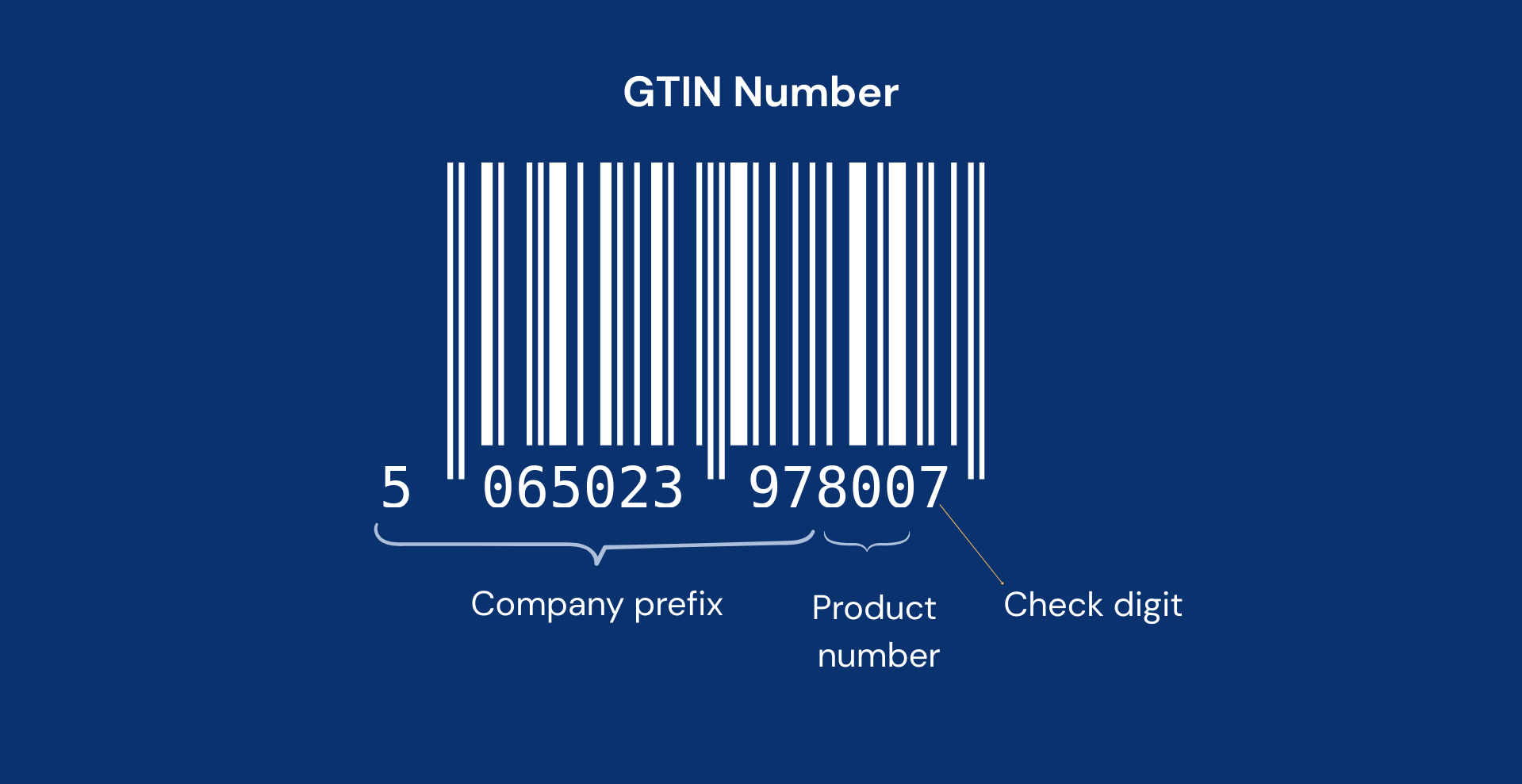
A GS1 company prefix defines a block of GTINs assigned to your company that start with a given string of numbers (the prefix) issued to your business by an official GS1 organization.
Every GTIN you create starts with this prefix. Marketplaces like Amazon, Google Shopping, and Walmart use it to verify that the barcode belongs to your business.
In the example below, if your prefix is 506502397, the product number is 800, and the check digit is 7, the GTIN will look like 5065023978007.

How many GTINs can you create?
The length of your prefix determines how many GTINs you can generate.
Most Shopify merchants purchase prefixes that support:
- 10 GTINs
- 100 GTINs
- 1,000 GTINs
If you’re unsure where to start, a 100 GTIN prefix is usually enough for many small to mid-sized stores.
Here’s an example of how prefix length determines the number of GTINs available:

Important: GS1 Assistant does not provide prefixes
GS1 Assistant manages the GTINs linked to your prefix.
It doesn’t generate free barcodes or sell GTINs.
The only exception is GS1 US customers, who can purchase a prefix through the app directly from GS1 US.
How to check if you already have a prefix
Option 1: Check your GS1 account
Log in to your GS1 member organization portal.
Your prefix should appear in your account dashboard.
Examples:
- GS1 US
- GS1 Germany
- GS1 UK
Option 2: Check your existing barcodes
If you’ve already assigned GTINs to products before, the first digits usually represent your prefix.
Example:
- GTIN:
00614141123457 - Prefix:
0614141
My prefix shows as ‘Invalid’ in the app
If you recently:
- purchased a prefix
- renewed your membership
it may take some time for GS1 databases to update.
In most cases:
- wait 24 hours
- click Start Scan to refresh the app
- try again
If your prefix still shows as invalid after 48 hours, contact support and the team can manually verify it.
If you don’t have a prefix yet: where to get one?
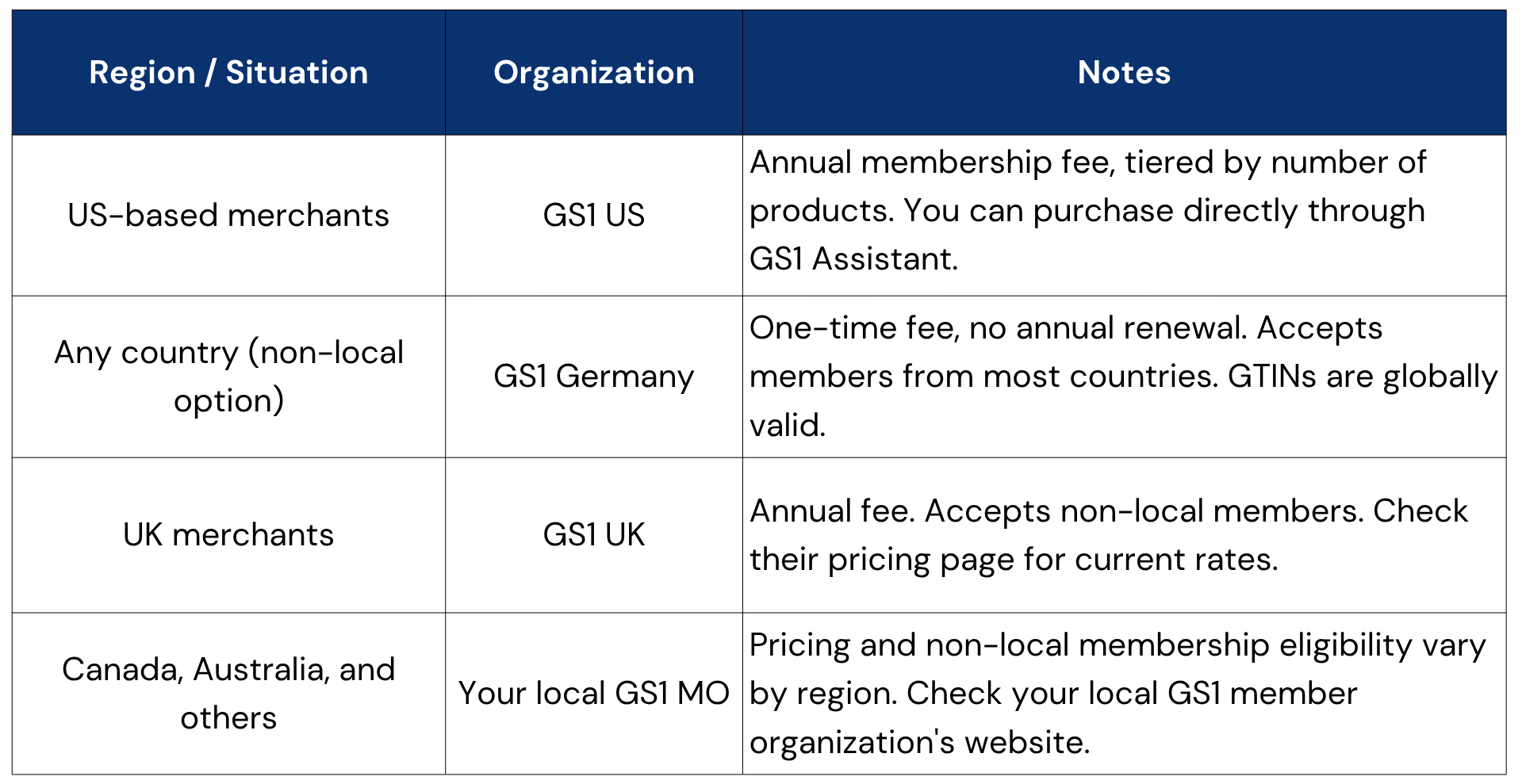
You must purchase a prefix from an official GS1 organization.
Your GTINs will still work globally regardless of which GS1 organization you purchase from.
UPC vs EAN: What should you know?
Prefixes from:
- GS1 US
- GS1 Canada
support UPC (12-digit) barcodes.
Most other GS1 organizations issue EAN (13-digit) barcodes. Amazon, Google Shopping, and Walmart accept both formats.
However, some physical US retailers still require UPC barcodes due to antiquated systems.
If you plan to sell through US retail stores, keep this in mind before choosing a GS1 organization.
Tip: Different GS1 Member Organizations have different pricing models, and some allow businesses outside their region to register as well. If you don’t need UPC codes, you can buy from GS1 Germany or GS1 UK, which are more cost-effective.
Some websites sell low-cost barcodes that are not registered to your business.
Marketplaces now verify GTIN ownership against GS1 records. If the barcode belongs to another company, your listings may be rejected.
GS1 Assistant may also flag these codes as invalid.
If you already have some of these on your products, see the article: How to Remove Invalid or ‘Not GTIN’ Barcodes in Bulk to clean them up.
Once you have your prefix
After getting your prefix, you can connect it to GS1 Assistant and start assigning GTINs to your Shopify products.
If you’ve already assigned GTINs manually before, you can also choose where the app should begin assigning new numbers to avoid duplicates.