 GS1 Assistant - Help Document
UPC vs EAN vs GTIN: What Do I Actually Need?
UPC, EAN, and GTIN are closely related terms that are often used interchangeably but it is often confused with different terminology.
This guide explains:
- What a GTIN is
- How UPC and EAN relate to GTINs
- Which barcode format you may need
- Common mistakes to avoid
What Is a GTIN?
GTIN stands for Global Trade Item Number.
A GTIN is a globally unique product identifier assigned to a trade item.
Retailers, marketplaces, distributors, and ecommerce platforms use GTINs to identify products.
The term GTIN is often used in two different ways:
- As the general name for the entire family of GS1 product identifiers.
- To refer to a specific format, GTIN-14 / SCC-14.
This can be confusing because someone might say "I need a GTIN" when they really mean a UPC or EAN.
In practice:
- Every UPC is a GTIN
- Every EAN is a GTIN
- Every GTIN-14 is a GTIN
GTIN is the umbrella term that covers all of these formats.
GTIN format
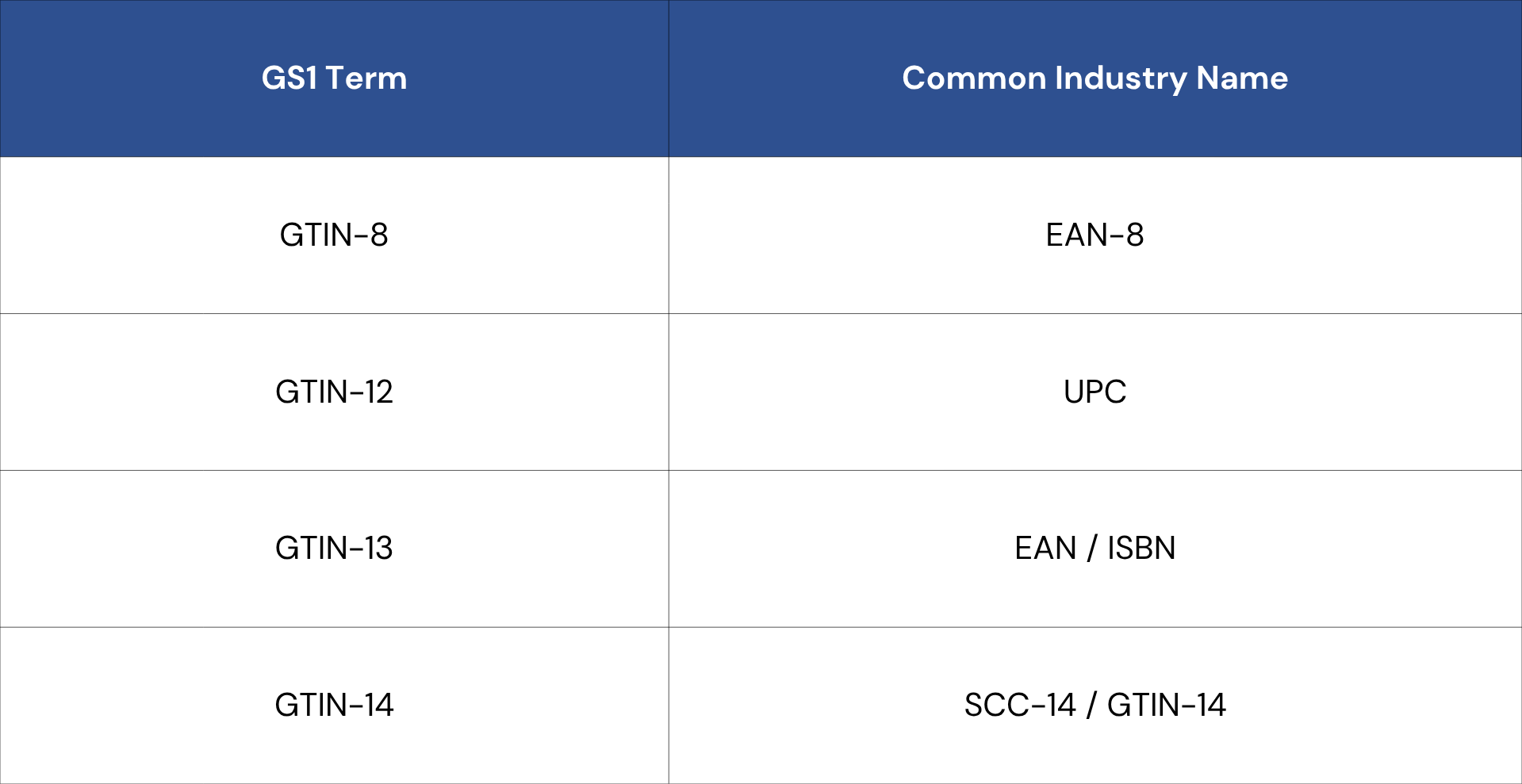
Note: ISBNs used for books and publications are represented as GTIN-13 values using ranges reserved for the publishing industry. ISBNs are assigned through the ISBN system rather than through GS1 Member Organizations. GS1 Assistant does not manage or assign ISBNs.
GTIN Support in GS1 Assistant
GS1 Assistant currently supports:
- UPC (GTIN-12)
- EAN (GTIN-13)
- GTIN-14 values with a packaging indicator of 0
GS1 Assistant does not currently support:
- GTIN-8 (EAN-8)
- GTIN-14 values with packaging indicators 1-9
GS1 Assistant supports GTIN-14 values derived directly from UPC and EAN product identifiers. These GTIN-14 values begin with a packaging indicator of 0. GTIN-14 is often referred to as SCC-14 in older retail, EDI, warehouse, and logistics documentation.
What Is a UPC?
UPC stands for Universal Product Code.
A UPC is a 12-digit GTIN format that originated in North America and remains widely used throughout the United States and Canada.
UPCs are generated from company prefix ranges allocated by GS1 Global to GS1 US and GS1 Canada.
What Is an EAN?
EAN stands for European Article Number.
An EAN is a 13-digit GTIN format commonly used throughout much of the world.
EANs are generated from company prefix ranges allocated by GS1 Global to GS1 Member Organizations outside the United States and Canada.
Despite the name, EANs are used globally and are accepted by most major retailers and marketplaces.
Which Format Do I Need?
For many businesses, the answer is simple:
Use the format issued by your GS1 Member Organization.
Most major ecommerce platforms, marketplaces, and retailers support both UPC and EAN formats.
If a retailer, marketplace, or trading partner has specific barcode requirements, follow those requirements.
If you are unsure which format to use, purchase GTINs from the GS1 Member Organization in your country or primary sales region and use the format they provide.
Selling on Shopify
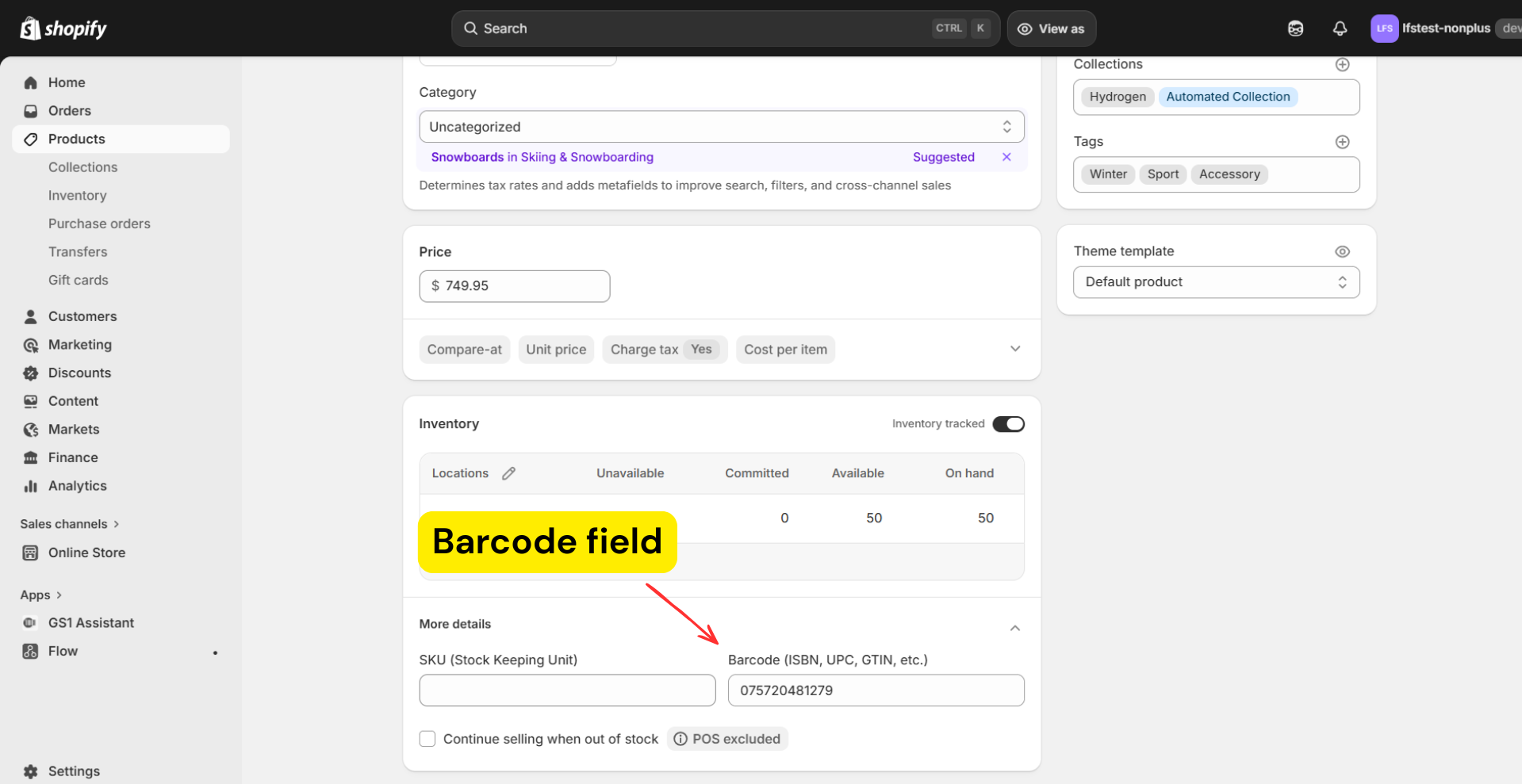
In Shopify, GTINs are stored in the Barcode field.
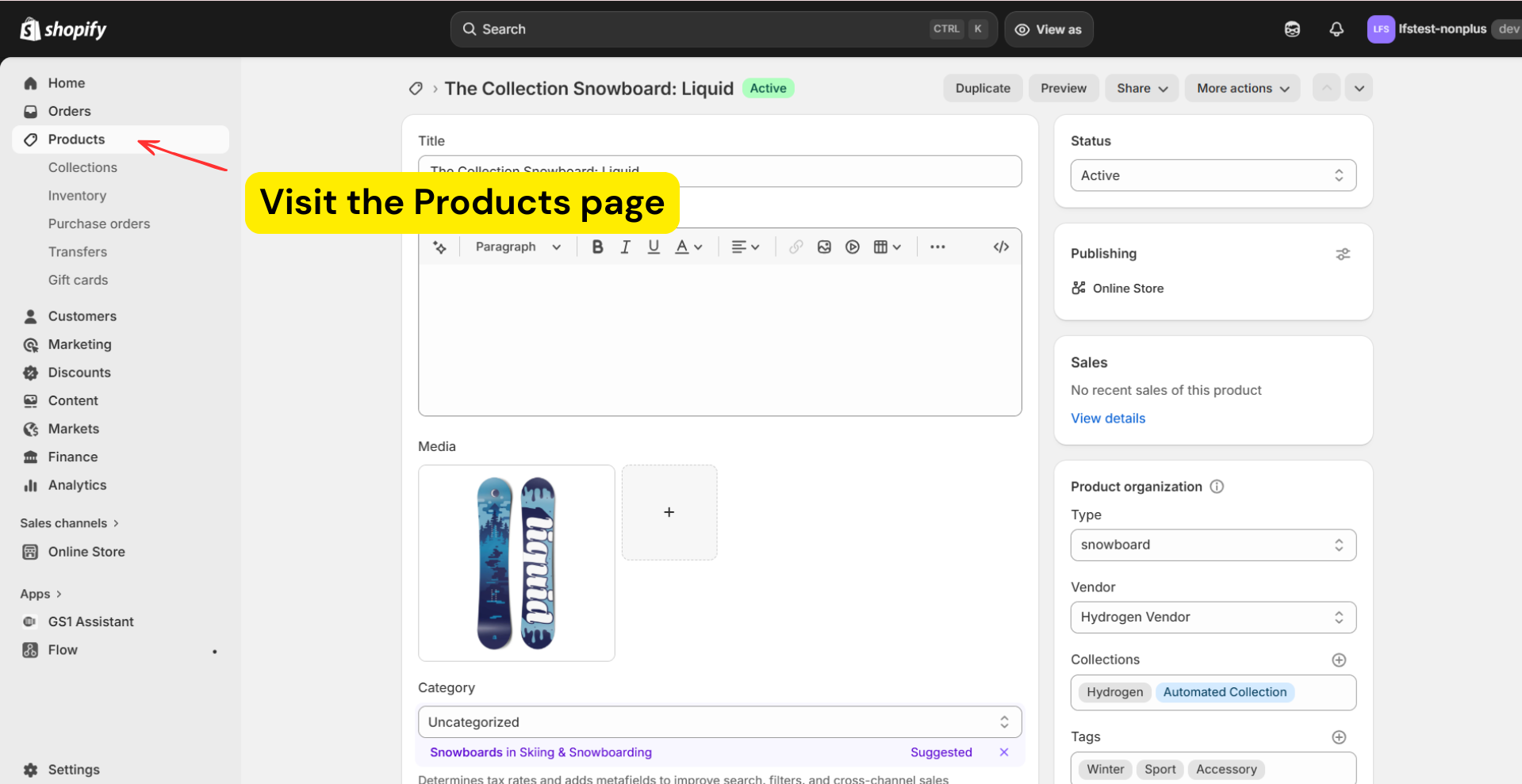
- To view, go to the Products page in Shopify
- Scroll down to the Inventory section, and you will see the Barcode field.
Each product variant should have its own GTIN.
Example:
- Small shirt = one GTIN
- Large shirt = another GTIN
Don't reuse the same GTIN across variants. It can cause:
- inventory problems
- marketplace errors
- listing conflicts
Do You Need GTINs If You Only Sell Through Your Own Store?
Not necessarily.
If you only sell products through your own Shopify store, you can create your own internal product identifiers instead of using GTINs.
However, many merchants choose to assign GTINs from the beginning because it makes future expansion easier.
GTINs are widely used by:
- Retailers
- Distributors
- Marketplaces
- Advertising platforms
- Inventory and warehouse systems
- EDI and wholesale programs
If you later decide to sell through additional channels, having GTINs already assigned can help avoid rework and product data updates.
Internal Use GTIN Ranges
GS1 reserves certain prefix ranges for internal use.
These ranges can be used to create barcode values for products that will not be sold through external retail or marketplace channels.
GS1 Assistant supports assigning GTINs from internal-use prefixes, allowing merchants to automatically generate unique barcode values without purchasing GTINs.
This can be useful when:
- Products are sold only through your own store
- Barcodes are needed for internal inventory processes
- You want a standardized barcode structure without purchasing GTINs
If you later decide to sell through retailers, marketplaces, or other channels that require GS1-issued GTINs, you can transition those products to official GS1 company prefixes.
Common Barcode Mistakes
Buying Resold Barcodes
Cheap reseller barcodes are often registered to another company.
Many retailers, marketplaces, and trading partners verify GTIN ownership and may reject barcodes that are not associated with your business.
Purchase GTINs from an official GS1 Member Organization.
Reusing GTINs Across Variants
Each product variant should have its own GTIN.
Different sizes, colors, or configurations should not share the same barcode.
Assigning the Same GTIN to Different Products
A GTIN should identify a single trade item.
Different products should not share the same GTIN.
Reusing GTINs across unrelated products can create problems with retailers, marketplaces, distributors, and inventory systems.
Next step
Once you know which GTIN format you need, continue to Adding and Managing Your Company Prefix